Harnesses Overview
AGRO installs no agent CLI at boot. A harness enters the sandbox only when you run agro harness install <id>. Claude Code, Codex, Pi, OpenCode, Hermes, OpenClaw, Grok Build, Muse Code, Antigravity CLI, and fx install through that door. The install lands in ~/.local inside the persistent home volume. The install survives a container recreate, because AGRO bakes no harness into the image. T3 Code is on demand: the /t3 skill (or npx t3) fetches the T3 Code package and serves a browser UI on port 3773.
Inside the sandbox, run agro tool install herdr, then run herdr, then launch whichever agent you prefer from its panes and switch between them at any time. Herdr is for interactive agents. Named tmux sessions are for AGRO's headless gateway and tunnel infrastructure.
AGRO is the harness; the agent is your call. To go beyond the catalog, install via npm / pip / cargo inside the sandbox or edit the Dockerfile.
Every harness gets the same workspace layout, skills, and hooks, so two or more agents can work in one environment at the same time. For example, a developer uses Claude Code in a Herdr pane to build the environment. At the same time, Hermes or Pi answers in Slack for the same environment from its own named tmux session. See Slack.
Installing a harness
agro harness install <id> is the only door. It probes the running sandbox, installs the CLI into ~/.local in the persistent home volume, and reports. It writes no project agro.json field. It never rebuilds or restarts the sandbox.
agro harness list                 # what exists, and what is installed
agro harness install opencode     # install into the running sandbox
agro harness uninstall opencode   # remove it again
agro harness status hermes        # one harness
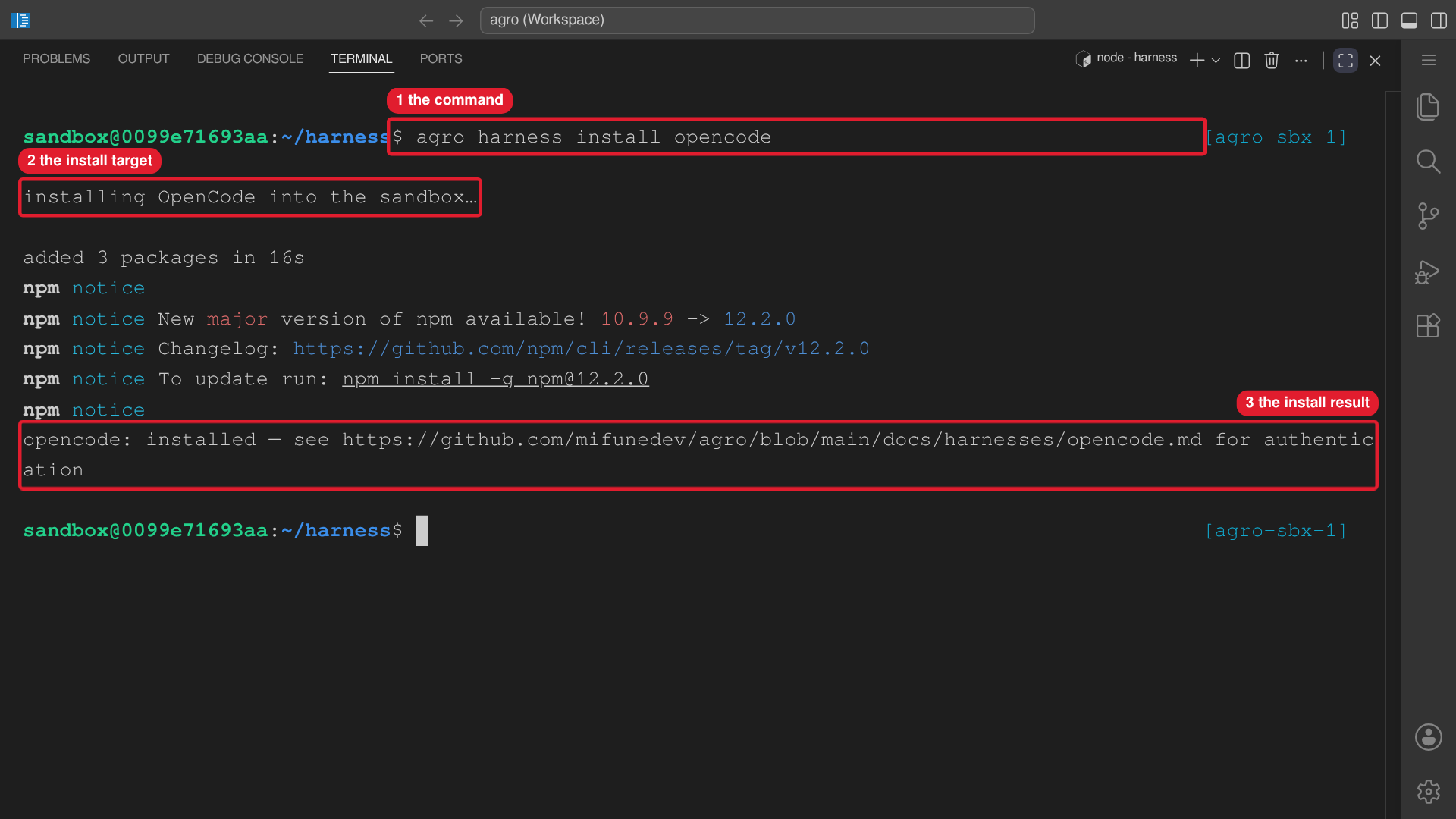 Callouts: 1 is the command. 2 is the install target. 3 is the install result.
When the sandbox is not running, install offers a host installation instead. See Lifecycle commands → Host workspaces for the host workspace model, precedence rules, and flags. One refusal matters here: the state home itself (~/.agro) can never be a harness root. If the resolved root is ~/.agro, move it out first, for example mv ~/.agro ~/agro. Then re-run the install.
Flags:
| Flag | Effect |
|---|---|
--json | list and status only: machine-readable output |
--host | install only: install on the host when the sandbox is not running |
--workspace <name> | install only: select the existing host workspace ~/.agro/workspaces/<name>; implies --host |
--path <dir> | install only: select an existing harness root outside the registry; implies --host |
--force | uninstall only: remove on the host with no recorded install |
agro harness also works from inside the sandbox. There it installs into the environment you are already in, and list/status report the CLIs present rather than ?. See Lifecycle commands → Where you are standing when you type agro.
Updating a harness
Two paths update a harness in the sandbox. Both land in /home/sandbox/.local in the persistent home volume.
agro harness install claude-code   # runs the install command again; installs the latest version
claude update                      # the harness updates itself
If AGRO installed the harness, agro harness install <id> runs the install command of the catalog entry again. Each install command installs the latest version.
- In the sandbox, AGRO writes the marker
/home/sandbox/.local/share/agro/harnesses/<id>.installedafter an install. If the marker exists and the binary runs, the command printsupdating <title> in the sandbox…. - On the host, AGRO records the install in the host config. If the record exists and the binary runs, the command prints
updating <title> on the host…. - On the host, if the binary runs but is outside
~/.local/binand has no record, AGRO did not install the binary. The command printsalready installedand changes nothing.
For Hermes, the update also configures the Hermes workspace again.
The harness self-update path works because npm's global prefix in the sandbox is /home/sandbox/.local, not /usr/local. Never run a harness update through sudo. The harness binaries are not on sudo's secure_path. A root-owned install would also land outside the home volume and disappear on the next recreate.
A new image can change the Node major, for example from Node 22 to Node 24. The home volume keeps the harnesses that npm built on the old Node. If a harness fails after the upgrade, run agro harness install <id>. The install rebuilds the harness on the new Node.
Removing a harness
agro harness uninstall <id> undoes an install. The command resolves its target exactly as install does: the running sandbox when one is reachable, the host when none is.
In the sandbox the command removes from /home/sandbox/.local with no further checks. On the host the command removes only what it recorded, and refuses when no record exists unless you pass --force.
agro harness uninstall opencode           # sandbox if running, else the host record
agro harness uninstall opencode --force   # host removal with no record, from ~/.local
Each catalog entry has a kind. installable harnesses install through the verb. npx fetches an on-demand harness (T3 Code) at each run; AGRO never installs it. An install persists because the home volume persists. agro destroy removes that volume, and the install with it.
Supported agents
| Agent | Role | Start command | Source |
|---|---|---|---|
| Claude Code | Anthropic's terminal coding agent | claude | agro harness install claude-code |
| Codex | OpenAI's CLI coding agent | codex | agro harness install codex |
| OpenCode | Terminal coding agent with OpenAI OAuth support | opencode | agro harness install opencode |
| Pi | Lightweight, customizable agent | pi | agro harness install pi |
| Hermes | Nous Research's self-improving terminal agent | hermes | agro harness install hermes |
| OpenClaw | Gateway-first personal agent runtime | OPENCLAW_STATE_DIR=<target-root>/.openclaw openclaw | agro harness install openclaw |
| Grok Build | xAI's terminal coding agent | grok | agro harness install grok-build |
| Muse Code | Meta's terminal coding agent | muse | agro harness install muse-code |
| Antigravity CLI | Google's terminal coding agent | agy | agro harness install antigravity-cli |
| fx | Vercel Labs' native coding agent (experimental) | fx | agro harness install fx |
| T3 Code | Browser UI over Claude/Codex/OpenCode (port 3773) | /t3 or npx t3 | on demand, no install |
Verifying installation
# Each CLI is present only after `agro harness install <id>`:
claude --version
codex --version
pi --version
opencode --version
hermes --version
grok --version
muse --version
agy --version
fx --version

npx t3 --version        # T3 Code — on demand, fetched by npx
Authentication
Install a harness with agro harness install <id>, then authenticate it. Authenticate at least one harness before use:
- Claude Code: run
claudeand follow the OAuth prompt (see Claude Code). - Codex: run
codex login(see Codex). - OpenCode: run
opencode auth login(see OpenCode). - Pi: configure provider keys via environment variables (see Pi).
- Hermes: run
hermes setup(see Hermes). - Muse Code: run
muse logininside the sandbox, or provideMETA_API_KEYto the launching process (see Muse Code). - Grok Build: run
grok login --device-authfor headless/remote auth,grok loginfor interactive OAuth, or setXAI_API_KEYas a fallback (see Grok Build). Cached~/.grok/auth.jsontakes precedence overXAI_API_KEY. - Antigravity CLI: run
agyand complete Google Sign-In; a remote sandbox prints an authorization URL and accepts a pasted code (see Antigravity CLI). AGRO has not yet validated login inside the sandbox. - fx: run
fx loginfor Vercel AI Gateway,fx login codexorfx login grokfor a subscription, orfx setupfor an AI Gateway API key (see fx). - T3 Code: authenticate one of Claude / Codex / OpenCode first, then run
/t3(ornpx t3) and open the printed pairing URL (see T3 Code).
Default surfaces
Two optional surfaces cover most day-to-day use:
- Pi+Slack — chat with the agent from Slack instead of the terminal.
- T3 Code — browser UI on port
3773driving Claude / Codex / OpenCode.
Pi+Slack and T3 Code each run in their own named tmux session per .agro/skills/t3/references/sandbox-processes.md. Open a browser surface in VS Code's Simple Browser (Ctrl+Shift+P → Simple Browser: Show; Cmd+Shift+P on macOS). The live UI then sits in a tab next to the code you edit.
Pi+Slack
The Pi agent with the Slack bridge loaded. Set the tokens with agro secret set and edit .pi/msg-bridge.json (see Slack integration). The client-slack-pi session starts automatically on container boot, or manually with agro gateway pi:
agro gateway status               # show client-slack-pi + client-slack-hermes
tmux attach -t client-slack-pi    # watch the live log
Talk to the agent from Slack (DM or @mention). Full setup: Slack integration.
T3 Code
Web UI on http://localhost:3773 over an already-authenticated provider. Prefer the agent skill:
/t3 start
/t3 url
Open the printed pairing URL (http://localhost:3773/pair#token=…) in the Simple Browser tab. Full setup: T3 Code.
Reattach to any session
tmux ls                          # list sessions
tmux attach -t <session-name>    # reattach (Ctrl-b d to detach)
See Connecting to the Sandbox for port forwarding and remote access.