Lifecycle commands (agro)
agro is the only front door to the sandbox lifecycle. This page is the single
source of truth for the verbs; every other document links here rather than
restating them.
agro self-upgrade upgrades the installed CLI.
agro vendor writes the .agro/ control
plane into a checkout. Do not confuse the two.
Every compose verb runs .agro/scripts/docker-compose.sh. That script owns
overlay resolution, project naming, and env plumbing.
A sandbox is a registry entry under ${AGRO_HOME:-~/.agro}/sandboxes/<name>/.
agro sandbox install docker writes it. Every later verb finds it by name from
any directory. See
Configuration → the two agro.json files.
Host prerequisites and the CLI install are in Installation.
The verbs
| Verb | Runs |
|---|---|
agro sandbox install <runtime> [--name <name>] [--checkout <dir>] [--home-mount <dir>] [--yes] [--version <X.Y.Z>] [--image[=<ref>]] [--no-build] | write the registry entry, then docker-compose.sh up -d inside it |
agro sandbox list [--json] | every registry entry: name, runtime, status, checkout |
agro sandbox upgrade <name> --version <X.Y.Z> | recreate one image-mode sandbox with the specified official release image; keep its home and named volumes |
agro shell [name] | an interactive zsh in the sandbox container |
agro stop [name] | docker-compose.sh stop — containers down, volumes kept |
agro restart [name] | docker-compose.sh restart |
agro logs [name] | docker-compose.sh logs -f |
agro ps [name] | docker-compose.sh ps |
agro destroy [name] [--yes] | docker-compose.sh down -v, then remove the registry entry — see below |
agro compose config | docker-compose.sh config — the resolved compose file |
agro egress log [name] | print the last 1000 lines of the proxy access log; mark each denied line DENIED — needs access.egress: "allowlist" |
agro egress reload [name] | rewrite egress-allow.txt and send the proxy squid -k reconfigure; the sandbox container keeps running — needs access.egress: "allowlist" |
agro self-upgrade [--dry-run] (alias agro update) | upgrade the installed agro executable through the mechanism that installed it — see below |
agro vendor [--from <dir> | --from-remote [--ref <ref>]] [--dry-run] [--force] | equip an empty checkout with .agro/, and upgrade an equipped one |
agro config show [--sandbox <name>] · agro config set <field> <value> [--sandbox <name>] | read and write agro.json |
agro config repo · agro config <integration> | create a GitHub repo and point origin at it; run an integration wizard |
agro secret set <KEY> [--sandbox <name>] · agro secret list [--sandbox <name>] | read and write the gitignored .env |
agro config langfuse | the interactive Langfuse tracing wizard — see below |
agro langfuse apply · agro langfuse status · agro langfuse disable | render, check, or remove the Langfuse tracing files — see below |
agro gateway <pi|hermes> · agro gateway status | .agro/scripts/gateway.sh |
agro harness · agro tool | install and inspect harnesses and tooling |
agro workspace create [<name>] [--path <dir>] [--ref <ref>] [--json] · agro workspace list [--json] | create and list host AGRO workspaces under ~/.agro/workspaces/ — see below |
agro auth login [--url <url>] · agro auth status · agro auth logout · agro auth token | sign in to agro-console and manage the console token — see below |
agro node create --spec <spec> [--ssh-key <uuid>]... [--name <name>] [--free-tier] [--json] · agro node list [--json] · agro node delete <id> [--yes] | create, list, and delete remote agro-console sandbox nodes — see below |
agro --help · agro --version | usage and version |
agro <verb> -- <args> forwards extra arguments to docker compose, e.g.
agro logs -- --tail 50.
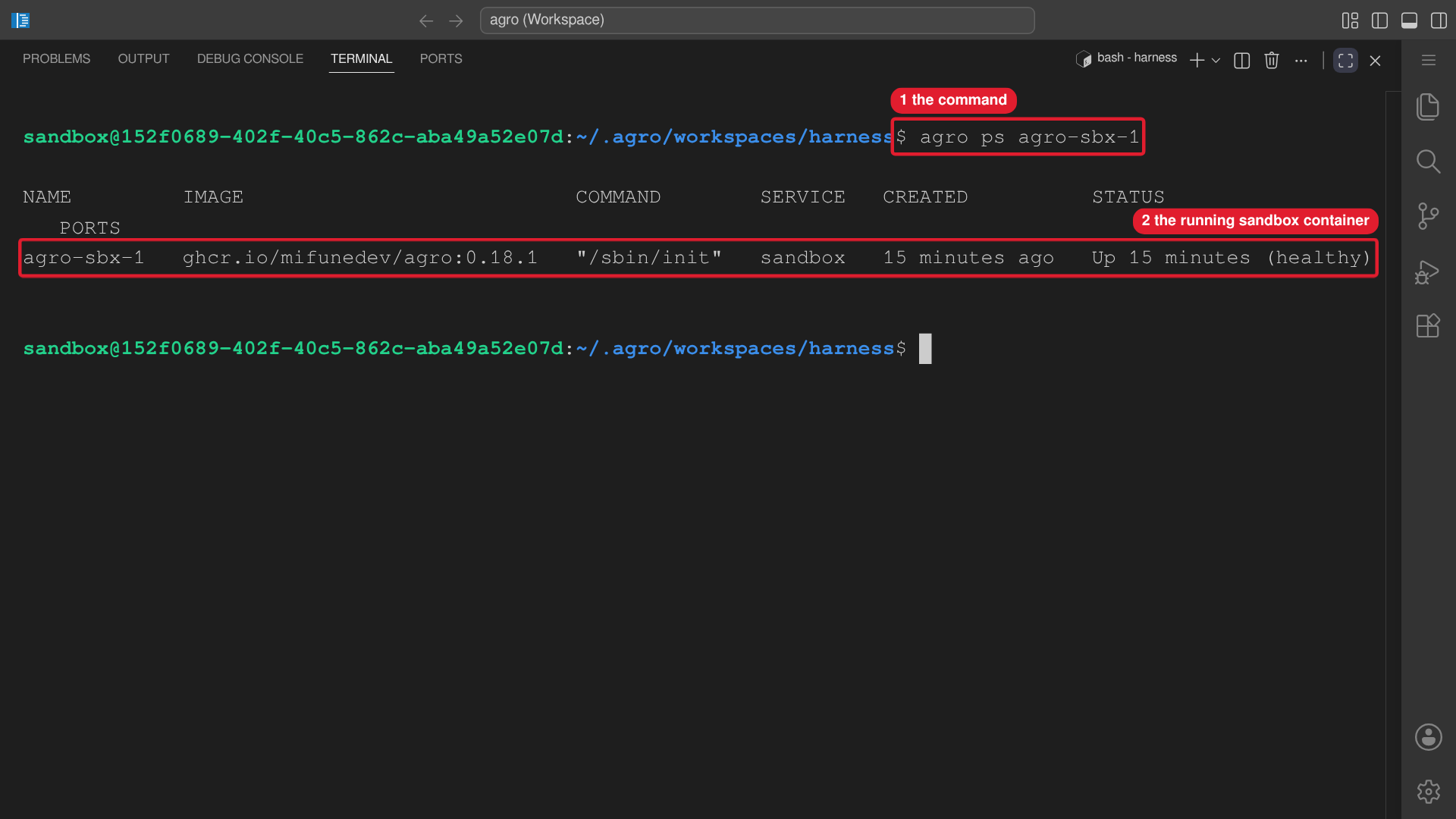 Callouts: 1 is the command. 2 is the running sandbox container.
Creating a sandbox
agro sandbox install docker is the one command that creates a sandbox. It runs
from any directory:
agro sandbox install docker      # wizard: name, timezone, git identity, SSH, Docker socket
agro shell <name>                # attach as the sandbox user
- The entry lands in
${AGRO_HOME:-~/.agro}/sandboxes/<name>/, holding its ownagro.json, its.env, and the compose files plus the wrapper script the CLI re-materialises on every lifecycle call. Editagro.json; the CLI generates the rest. - The default name is
agro-sbx-<n>, the lowest unused number.--yesprompts zero times and keeps every default. - Without
--checkoutthe sandbox runs the prebuilt image and the image's/opt/agro-seedseeds the workspace volume. With--checkout <dir>, the CLI bind-mounts that checkout at/home/sandbox/harness, and the sandbox can build locally.--repo <dir>is a deprecated alias. Recipes: Creating a sandbox. dockerandopenshellare the provisionable runtimes.openshellis experimental and interactive-only:agro sandbox install openshellnever prompts, refuses--checkoutand--home-mount, and needs the hostopenshellCLI. See NVIDIA OpenShell. On anopenshellentry,agro stop,restart,logs,ps,compose config, andsandbox upgradeexit 1 and print theopenshellcommand to run.agro sandbox install microsandboxrefuses. Inside a sandbox,agro tool install microsandboxinstalls themsbbinary.
agro sandbox with no subcommand prints help and exits non-zero.
How a verb finds your sandbox
agro shell|stop|restart|logs|ps|destroy [name] resolve in this order:
- the
nameyou passed; - the single registered entry, when exactly one exists;
- the entry whose
checkoutcontains the current directory, under either that field or the aliasrepo; - otherwise an error listing every registered name.
agro sandbox list prints that list, with the container status of each.
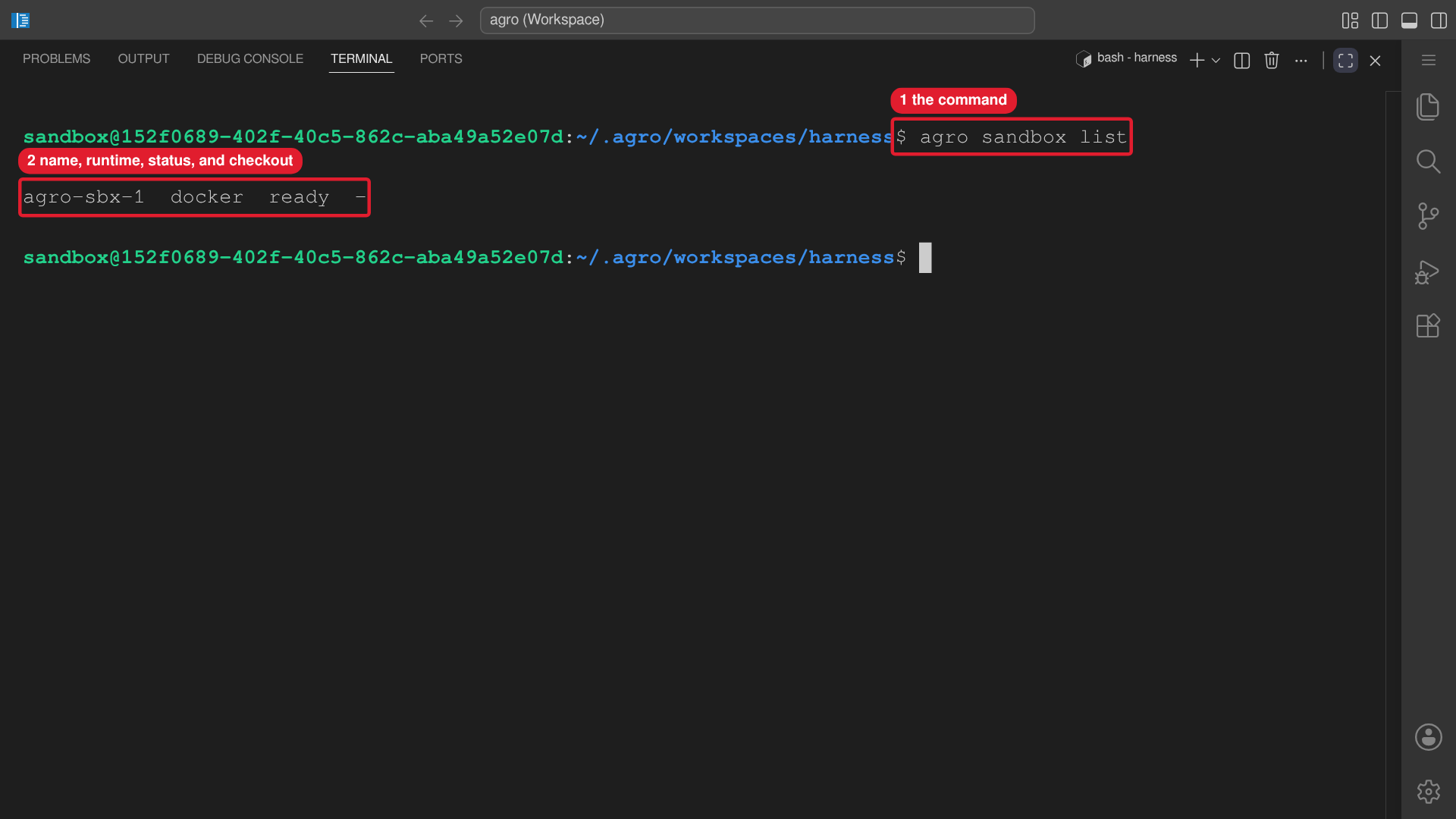 Callouts: 1 is the command. 2 is name, runtime, status, and checkout.
agro sandbox list --json prints the same entries as JSON. Each entry carries the
bound directory under the key checkout. The JSON output keeps the key repo as
a deprecated key. It holds the identical value and stays present for existing consumers. Read
checkout.
Upgrading a sandbox image: agro sandbox upgrade
Run agro sandbox upgrade <name> --version X.Y.Z on the host to apply a specific
AGRO release image to a registered image-mode sandbox. The command also accepts
a leading v or a release prerelease suffix. The command requires an explicit
version and never selects latest. The command refuses build-mode sandboxes
and missing entries.
The command recreates the container immediately. Every active agent session,
server, and job inside that container stops. Choose a time when the interruption
is acceptable. The new container keeps the sandbox home mount, named volumes,
checkout, .env, and unrelated configuration. The command does not use down -v.
The command records image.ref only after a successful start. On a failure it
keeps the old image.ref and tries to restore the old image. If the restore
fails, inspect the sandbox with agro ps <name> and repair it.
The command holds .sandbox-upgrade.lock in the entry while it runs. A crash or
SIGKILL can leave the lock, and the next upgrade of that entry refuses and
prints the lock path. To recover on the host:
- Confirm that no upgrade process owns the entry.
- Remove the exact lock path that the command printed.
- Run
agro sandbox upgrade <name> --version X.Y.Zagain.
A conflicting AGRO_SANDBOX_IMAGE in the host shell or entry .env causes a
refusal before recreation.
agro sandbox upgrade changes the sandbox image, not the installed host CLI.
Use agro update to upgrade the installed CLI without changing a sandbox.
Upgrading the CLI: agro self-upgrade
agro self-upgrade (alias: agro update) upgrades exactly one thing: the running agro executable.
The upgrade writes no project file — no .agro/, no agro.json, no .env — and
the upgrade never asks for sudo. The upgrade follows whichever mechanism installed the
executable:
| Installation | Detected as | What agro self-upgrade does |
|---|---|---|
npm install -g @mifune/agro | realpath under node_modules/@mifune/agro/ | reads the registry version with npm view, then runs npm install -g --prefix <owning prefix> @mifune/agro@<version> |
install.sh | a plain file | downloads AGRO_JS_URL (default https://github.com/mifunedev/agro/releases/latest/download/agro.js) into the same directory, checks its shebang and --version, renames it over the executable, and keeps <path>.prev until the new file verifies |
agro self-upgrade refuses, and prints the supported procedure, in each of these
cases: the sandbox image ships the executable (/opt/agro); the executable is a
source checkout's dist/; the CLI cannot resolve the executable; the executable
sits in a read-only directory; another agro earlier on PATH shadows the
executable; or the executable does not report the running version. For the
image-shipped CLI, refresh the image from the host with agro stop <name>, then
agro sandbox install docker --name <name>. The upgrade
refuses a downgrade. When the installed version is already current, the upgrade
changes nothing. --dry-run reports the installation kind, target, and versions
without a change.
agro self-upgrade rejects the payload flags --from, --from-remote, --ref,
and --force and points at agro vendor.
Equipping a checkout: agro vendor
agro vendor is the command that vendors the
.agro/ control plane into the current directory. agro vendor
equips an empty directory from scratch and upgrades an equipped directory. Payload precedence:
--from <dir>, then --from-remote [--ref <ref>], then the CLI's own bundled
payload, then a remote fetch announced on one line. --dry-run previews the
changes; --force overrides the up-to-date and downgrade gate.
It writes nothing else — no agro.json, no .env, no AGENTS.md, no
.gitignore line, no .devcontainer/, no provider configuration. Those files
are yours. agro vendor never prompts. agro vendor does not upgrade the CLI
itself; agro update does.
Where you are standing when you type agro
agro runs on the host and inside the sandbox, and it resolves a different
execution target for each. On the host it drives the container through Docker
Compose. Inside the sandbox it runs commands directly, because the sandbox is
the environment those commands target.
Detection is automatic. agro treats itself as in-sandbox when the image marker
/etc/agro/sandbox exists. When the marker is absent, agro uses the fallback
rule: /.dockerenv exists and SANDBOX_NAME holds a value. The fallback
covers a newer CLI that runs on an older image. When only the fallback rule
matches, agro prints one warning line on stderr that names /etc/agro/sandbox.
Upgrade the sandbox image to remove the warning. Override the detection with
AGRO_EXECUTION_TARGET=local or AGRO_EXECUTION_TARGET=docker-compose.
| Verb | On the host | Inside the sandbox |
|---|---|---|
agro harness install | installs into the running container over Docker Compose; offers a host install when the container is not reachable | installs live, in place |
agro harness uninstall | removes from the running container over Docker Compose; removes the recorded host install when the container is not reachable | removes live, in place |
agro tool install | installs into the running container over Docker Compose; offers a host install when the container is not reachable and the catalog entry allows one | installs live, in place |
agro tool uninstall | removes from the running container over Docker Compose; removes the recorded host install when the container is not reachable | removes live, in place |
agro harness list/status | probes the host install prefix ~/.local when the container is not reachable; reports ? when neither a harness root nor that prefix exists | reports the real state of this environment |
agro tool list/status | probes the host install prefix ~/.local when the container is not reachable; reports ? when neither a harness root nor that prefix exists | reports the real state of this environment |
agro sandbox install | provisions the sandbox | refuses with a host-only error |
agro sandbox upgrade | recreates one image-mode sandbox with an explicit release image | refuses with a host-only error |
agro shell | docker exec into the container | opens a local zsh |
agro harness and agro tool treat an unspawnable container runtime as an
unreachable sandbox. On a host with no Docker, install, uninstall, list and
status all use the host path instead of failing.
agro sandbox install changes the sandbox's own Docker configuration, so it stays
host-only rather than failing halfway.
agro harness install <id> and agro tool install <id> are the only way a harness
or a tool enters the sandbox. Nothing installs at boot, so a fresh sandbox has
no herdr until you run agro tool install herdr. Each install lands in
~/.local in the persistent home volume; agro destroy removes it.
agro harness install <id> also installs on the host. When the sandbox is not
running it uses an existing AGRO workspace as the harness root — --workspace <name> or
--path <dir>, then harnessRoot in ~/.agro/config.json, then the registry entry
~/.agro/workspaces/harness — and installs the harness
into ~/.local for the invoking user. The install prefix is never derived from
the harness root, so the clone stays clean. A non-interactive run needs --host
or --path; without either it keeps the refusal. See
Harnesses Overview.
A harness or tool counts as installed only after a complete install. In the
sandbox, agro harness install writes
~/.local/share/agro/harnesses/<id>.installed and agro tool install writes
~/.local/share/agro/tools/<id>.installed after the full install command
succeeds. On the host, each command records a receipt in ~/.agro/config.json.
If an install fails after the binary appears, the next install runs the full
install again. The uninstall command removes the record. A host binary outside
~/.local still counts as installed. A root-level host tool, such as
docker-engine or desktop, also counts as installed when its check passes.
agro tool install <id> uses the same host path. The host tools, their install
levels, and the root-level tools are in
Installation → Host tools.
Host workspaces: agro workspace
A host workspace is an AGRO checkout under
${AGRO_HOME:-~/.agro}/workspaces/<name>/. It carries the control plane that a
harness on the host reads: AGENTS.md, .agro/skills/, the hooks, and task
state. agro workspace is the only verb that creates one.
agro workspace create                     # clone into ~/.agro/workspaces/harness
agro workspace create default             # clone into ~/.agro/workspaces/default
agro workspace create acme                # clone into ~/.agro/workspaces/acme
agro workspace create --path /srv/agro    # clone into /srv/agro, outside the registry
agro workspace create --ref v0.15.0       # clone tag v0.15.0 into ~/.agro/workspaces/harness
agro workspace list                       # every workspace, with the default marked
agro workspace list --json                # the same rows as JSON
agro workspace create [<name>]cloneshttps://github.com/mifunedev/agro.gitinto the target directory. The command reuses a target that already holds a.gitcheckout, and clones nothing.- The implicit name is
harness. Passdefaultto create a workspace nameddefault. The name becomes a path segment, so it obeys the sandbox name rule: lowercase letters, digits and dashes, starting with a letter or a digit. The command refuses any other name and creates nothing. --path <dir>creates the workspace outside the registry. Pass a name or--path <dir>, never both.--ref <ref>clones the branch or tag<ref>instead of the default branch. A tag gives a detached checkout. If<ref>does not exist, the command exits 1, names the ref, and leaves no target directory. The command reuses a target that already holds a.gitcheckout and does not change its ref.listrefuses--ref.createrecords no default. The command leavesharnessRootin~/.agro/config.jsonunchanged. Only a host install writes that key.agro workspace listreports every child of~/.agro/workspaces/that obeys the name rule and holds a.gitmarker. TheDEFAULTcolumn marks the workspace thatharnessRootnames. An empty registry prints one hint that namesagro workspace create.createrefuses a target directory equal to the state home~/.agro.
agro harness install --host and agro tool install --host create no workspace.
Each verb resolves an existing workspace and exits 1 when none resolves. The
refusal lists every workspace that exists and names agro workspace create. See
Harnesses Overview.
Console sign-in: agro auth
agro auth signs in to the agro-console API and manages the console token.
Run agro auth on the host that runs agro node.
agro auth login     # sign in through the browser, store the token
agro auth status    # show the signed-in identity
agro auth logout    # revoke the token, delete the credentials file
agro auth token     # print the token
agro auth loginstarts a device authorization. The command printsOpen <url> and enter the code <code>. Open the URL in a browser and approve the code. After the approval, the command writes the credentials file, printslogged in to <url> as <login>, and exits 0. If the operator denies the code or the code expires, the command writes no file and exits 1.agro auth login --url <url>signs in to that console. Without--url, the command usesAGRO_CONSOLE_URL, thenhttps://console.mifune.dev.- The credentials file is
$XDG_CONFIG_HOME/agro/console.json. WhenXDG_CONFIG_HOMEis not set, the file is~/.config/agro/console.json. The file has mode0600. The CLI does not read a console token from the project.env. agro auth statusprints the URL, the login, the role, the org, the token source (envorfile), and the token prefix. The command never prints the full token. When no token resolves or the console rejects the token, the command exits 1.agro auth logoutrevokes the token in the console, deletes the credentials file, and exits 0. If the console reports that the token is already revoked, the command deletes the credentials file, printstoken was already revoked; removed local credentials, and exits 0.agro auth tokenprints the token on stdout. When no token resolves, the command exits 1.- If the environment sets
AGRO_CONSOLE_TOKEN, the CLI uses that token withAGRO_CONSOLE_URL, thenhttps://console.mifune.dev. The CLI does not read the credentials file in this case. Use the environment variables in CI. - If the environment does not set
AGRO_CONSOLE_TOKEN, the CLI uses the token and the URL from the credentials file.AGRO_CONSOLE_URLdoes not change the URL of a token from the credentials file. When the file has no URL, the CLI useshttps://console.mifune.dev. - When the token comes from
AGRO_CONSOLE_TOKEN,agro auth logoutexits 1 and printstoken comes from AGRO_CONSOLE_TOKEN; unset it to log out.
Remote console nodes: agro node
agro node manages remote VMs through the agro-console API. agro node does not manage
local Docker sandboxes. Use agro sandbox for a local sandbox.
agro node create --spec <spec>   # create a sandbox node, wait for running
agro node list                   # every node: id, name, profile, status, IPv4
agro node delete <id>            # destroy one node after a confirmation
- Each verb finds the token and the URL in the same order as
agro auth. If the environment setsAGRO_CONSOLE_TOKEN, the verb uses that token withAGRO_CONSOLE_URL. Otherwise the verb uses the token and the URL from the credentials file thatagro auth loginwrites. - The console URL is
https://console.mifune.devby default. If no token resolves, the verb exits 1 and printsnot logged in to agro-console: run agro auth login. agro node createcreates a node with the profilesandbox.--specis mandatory.--free-tierrequests the agro-console free tier and sets the default spec ton4.--namesets the node name.--ssh-key <uuid>is optional. When you give one or more--ssh-keyflags, the command uses only those console SSH keys. When you give no--ssh-key, the command reads~/.ssh/id_ed25519.pub. The command reuses the console SSH key that matches this public key. If no console key matches, the command registers the public key with the nameagro-cli@<hostname>. If~/.ssh/id_ed25519.pubdoes not exist, the command exits 1 and printsno --ssh-key given and ~/.ssh/id_ed25519.pub not found.agro node createwaits up to 15 minutes for the statusrunning, then prints the node id, the status, and the SSH command. If the node fails or does not reachrunningin 15 minutes, the command exits 1 and prints the last status.agro node listprints one row for each node. If no node exists, the command printsno nodes.agro node delete <id>asks for a confirmation.--yesskips the confirmation. Destroy needs the admin role in agro-console. If the console returns HTTP 403, the command exits 1 and printsdestroy needs the admin role in agro-console.--jsononcreateandlistprints JSON instead of text.
Langfuse tracing: agro config langfuse and agro langfuse
agro config langfuse is the interactive wizard. It writes the non-secret
fields to the langfuse section of agro.json and both keys to .env, then
applies the configuration. Without a TTY it runs agro langfuse apply.
| Verb | Runs |
|---|---|
agro langfuse apply | render the credential fragment and one tracing file per harness |
agro langfuse status | print the settings and the state of every generated file; exit non-zero on drift |
agro langfuse disable | set langfuse.enabled=false and delete the credential fragment |
The generated files live in the sandbox home, so run these verbs in the sandbox. Full reference: Langfuse.
agro destroy and its confirmation policy
down -v wipes the sandbox home volume, and that volume holds provider
authentication. agro destroy is therefore the only lifecycle verb that asks
before it runs. agro destroy names the volumes to delete, as read
from .devcontainer/docker-compose.yml, not hardcoded. Next, agro destroy
requires you to type the sandbox name. Any other input, including a blank line or
a wrong name, aborts with a non-zero exit and removes nothing.
After down -v succeeds, agro destroy also removes the registry entry under
${AGRO_HOME:-~/.agro}/sandboxes/<name>/, so the name becomes free again.
When storage.homePath points the home mount at a host path, down -v cannot
delete the host directory. agro destroy says so and leaves the directory in place.
To delete the directory, remove the directory yourself.
Non-interactive use requires an explicit flag. When stdin is not a terminal
and --yes is absent, agro destroy refuses outright rather than assume consent.
agro compose config, not agro config
agro config already means "read, write, or configure configuration"
(agro config show, agro config set, agro config <integration>), so the
resolved-compose printer lives under its own namespace: agro compose config.
That leaves room for further agro compose <passthrough> verbs without ever
colliding with the config and integration verbs.
VS Code "Reopen in Container" applies no overlays
Attaching VS Code to a container that agro sandbox install docker already
started is safe and is the recommended editor path — see
Connecting to the sandbox.
Provisioning from VS Code is different. Dev Containers: Reopen in
Container reads .devcontainer/devcontainer.json, whose dockerComposeFile
lists docker-compose.yml and nothing else. It never runs
.agro/scripts/docker-compose.sh, so no overlay applies on that path:
access.ssh→ nodocker-compose.ssh.yml, so no sshd and no published SSH portaccess.dockerSocket→ nodocker-compose.docker-sock.yml, so no host Docker socketcomposeOverrides[]→ every extra overlay path is ignored
Secrets still reach that container: compose auto-loads the .devcontainer/.env
beside the compose file, and that file is a symlink to the root .env.
Non-secret agro.json settings only reach compose when agro renders them, so
on this path each variable falls back to its default in
.devcontainer/docker-compose.yml.
storage.homePathAGRO_HOME_MOUNT is one of those rendered-only variables, so Reopen in
Container falls back to the Docker-managed <name>_workspace volume even when
storage.homePath points the sandbox home at a host directory. The volume becomes a
second, separate home: agent logins made through agro sandbox install docker are not there,
and the two diverge silently from then on.
If you set storage.homePath, always provision with agro sandbox install docker and attach.
If you need any overlay, provision with agro sandbox install docker. Then use
Dev Containers: Attach to Running Container instead of Reopen in Container.