Herdr
Herdr is the primary interactive workspace of AGRO. The image does not include Herdr. Only agro tool install herdr puts Herdr in the sandbox.
Start here
A fresh sandbox has no herdr. After you enter the sandbox, install Herdr. Next, run herdr:
# host
agro shell

# first commands inside the sandbox
agro tool install herdr
herdr
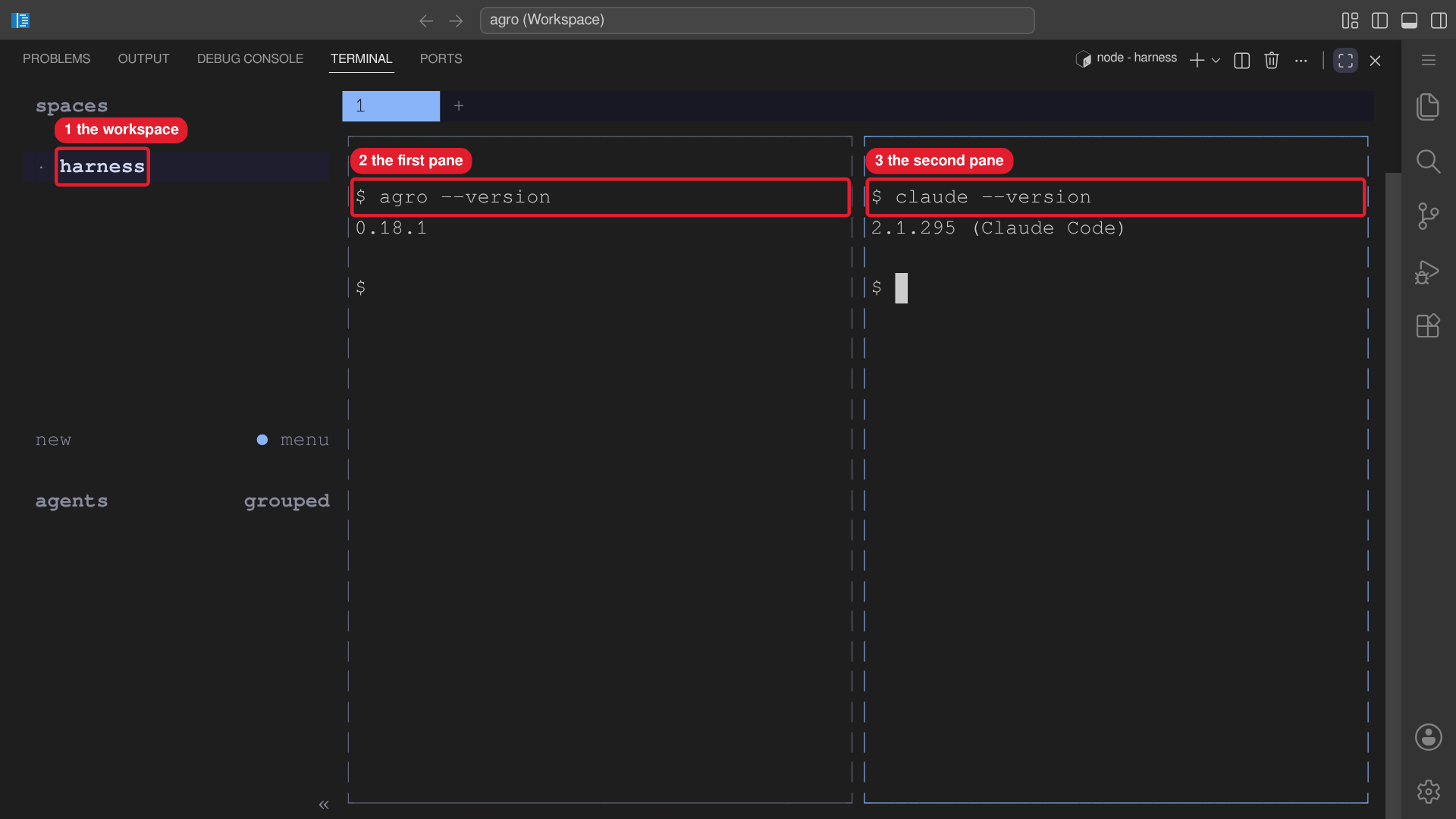 Callouts: 1 is the workspace in the spaces list. 2 is the first pane. 3 is the second pane.
The install lands in ~/.local/bin inside the persistent home volume, so later
boots find herdr on PATH immediately. agro destroy removes the volume and
the install with it.
Bare Herdr works before GitHub or provider authentication. It creates or reattaches a workspace for the current repository. Complete GitHub setup, provider authentication, agent sessions, tests, development servers, and reviews from Herdr panes so interactive work stays together.
# inside the initial Herdr pane
gh auth login && gh auth setup-git
claude auth login                 # or configure codex / pi
claude                            # launch agents from Herdr panes
Agent detection works without extra hooks. Optional integrations provide richer status and session restore, but modify provider configuration and are never installed automatically:
herdr integration install claude # or: codex, pi
herdr integration status
Working model
- Use Herdr workspaces, tabs, and panes for interactive setup, agents, tests, servers, and reviews.
- Detach with
Ctrl-b q; runherdragain to reattach while the container keeps running. - AGRO automation worktrees stay under
.worktrees; open those paths in Herdr. Herdr-created worktrees default to~/.herdr/worktrees. - The Slack gateway and tunnels remain in their existing tmux sessions. Do not run Herdr inside those managed sessions.
- A raw shell or direct agent command remains a recovery path if Herdr is unavailable.
Persistence
~/.config/herdr: configuration, logs, and session metadata.~/.herdr: Herdr-created worktrees and related data.
Both persist in the single /home/sandbox mount.
agro stop and normal rebuilds preserve metadata and layout in these volumes, but stopped containers do not preserve running agent, test, or server processes. agro destroy runs Compose with -v and removes the volumes too.
Troubleshooting
herdr --version
herdr status
herdr --help
herdr server reload-config
herdr server stop              # end a broken Herdr server
herdr --no-session             # run Herdr without its server/client session
The AGRO tool catalog (.agro/cli/src/lib/tools/catalog.ts) pins the Herdr version and checksum. agro tool install herdr downloads that binary, verifies the checksum, and installs the binary at ~/.local/bin/herdr. Nothing installs Herdr at boot. To upgrade, change the pin and run agro tool install herdr. Do not self-update the binary in place.
See the upstream quick start, agents guide, and configuration reference.